

For companies running between 50 and 500 employees, the moment when your ERP system starts slowing you down rather than supporting you is unmistakable. Reports take longer to generate. Remote employees struggle to access data. IT staff spend more time patching on-premise servers than solving real business problems. If that sounds familiar, you are not alone — and the conversation increasingly points toward one direction: moving Business Central off local infrastructure and into a managed cloud environment.
Also Read: Mastering Local Map Pack Visibility for Trade Contractors
This article breaks down what that transition actually involves, what to watch out for, and how to evaluate whether your organization is ready.
What Makes Business Central Different From Generic Cloud Software
Microsoft Dynamics 365 Business Central is not a lightweight SaaS tool. It is a full-featured ERP platform covering finance, supply chain, sales, project management, and operations. That depth is exactly why mid-market companies choose it — and also why migrating it to the cloud is more involved than simply moving files to a shared drive.
Business Central can run in two broad configurations: as a fully cloud-hosted SaaS deployment managed entirely by Microsoft, or as a managed private cloud deployment where a third-party provider hosts the application on dedicated infrastructure. The second option is often preferred by companies that have customized their Business Central environment extensively, have compliance requirements that restrict where data can reside, or need tighter control over performance and uptime guarantees.
Understanding which model fits your organization is the first real decision point — and it is one that many companies skip too quickly.
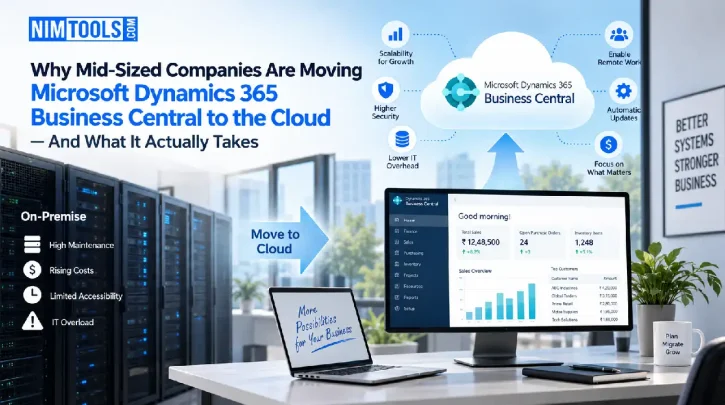
The Hidden Costs of Staying On-Premise
On-premise ERP deployments carry costs that rarely appear in a single line item on a budget. They are distributed across hardware refresh cycles, software licensing, internal IT labor, backup infrastructure, and the downtime that occurs when any of those components fail.
For a company with 100 to 300 users, maintaining an on-premise Business Central environment typically means dedicating meaningful IT staff time to server maintenance, SQL database management, and update testing — tasks that generate no direct business value. When a server fails or a critical update breaks a customization, the cost is not just the repair bill. It is the hours of lost productivity across every department that depends on the system.
Cloud environments shift that burden. Instead of your internal team managing the infrastructure layer, a hosting provider handles hardware, redundancy, patching, and uptime. Your IT staff can redirect their attention toward projects that actually move the business forward.
There is also the question of scalability. On-premise infrastructure is sized for a specific moment in time. If your business grows by 40 percent over two years, you either over-provisioned at the start — paying for capacity you did not need — or you under-provisioned and now face an expensive hardware upgrade. Cloud environments scale with actual usage, which is a meaningful financial advantage for companies in growth phases.
What a Managed Cloud Migration Actually Looks Like
One of the reasons companies delay cloud migration is that the process feels opaque. Here is a realistic picture of what a well-managed Business Central migration involves.
Assessment and environment audit. Before any data moves, a competent provider will audit your existing Business Central environment — documenting customizations, integrations with other systems (payroll, CRM, e-commerce platforms), data volumes, and user access patterns. This step is not optional. Skipping it is the most common reason migrations fail or go significantly over budget.
Staging and testing. A parallel environment is built in the cloud, and your data and customizations are migrated there first. Your team runs real workflows in the staging environment to catch issues before the production cutover. This phase typically takes longer than companies expect, particularly when there are legacy integrations or heavily modified report layouts.
Cutover and go-live. The actual switch from on-premise to cloud is planned for a low-activity window — often a weekend or end-of-month period. A good provider will have a rollback plan ready in case something unexpected surfaces.
Ongoing management. Post-migration, the hosting provider takes responsibility for infrastructure monitoring, backup verification, security patching, and performance tuning. You should receive clear SLAs covering uptime, response times for incidents, and escalation paths.
For organizations evaluating providers, looking specifically at cloud hosting for Business Central that is purpose-built for the platform — rather than generic virtual machine hosting — makes a significant difference in how smoothly the environment performs and how quickly issues are resolved.
What to Evaluate Before Choosing a Hosting Partner
Not all managed hosting providers are equally equipped to handle Business Central. Here are the questions worth asking before signing a contract.
Do they have direct Microsoft partnership credentials? Microsoft’s partner ecosystem has specific tiers and competencies. A provider with a recognized Microsoft partnership has demonstrated technical knowledge and has access to escalation paths that generic hosting companies do not.
What does their backup and disaster recovery architecture look like? Ask specifically about recovery time objectives (RTO) and recovery point objectives (RPO). Vague answers about “regular backups” are a warning sign. You want specific numbers and a documented process.
How do they handle Business Central updates? Microsoft releases major updates to Business Central twice a year. A hosting provider should have a clear process for testing those updates against your customizations before they are applied to your production environment.
What is included in the support agreement? Some providers charge separately for help desk support, performance tuning, or after-hours incident response. Understand exactly what is covered before comparing prices across vendors.
Can they support your integrations? If Business Central connects to your warehouse management system, your bank feeds, or a third-party reporting tool, the hosting environment needs to support those connections reliably. Ask for references from clients with similar integration complexity.
Making the Decision
Moving Business Central to a managed cloud environment is not the right move for every organization at every moment. If your on-premise setup is stable, your IT team has capacity, and you have no near-term growth plans, the urgency is lower. But for companies experiencing growing pains — slower system performance, difficulty supporting remote workers, IT staff stretched thin, or an upcoming hardware refresh that would cost more than a cloud migration — the calculation often favors moving sooner rather than later.
The companies that navigate this transition most successfully tend to share a few traits: they involve both IT and finance leadership in the evaluation, they take the assessment phase seriously rather than rushing to a decision, and they choose a hosting partner with demonstrated Business Central expertise rather than the lowest-cost generic option.
Cloud infrastructure for ERP is no longer a frontier technology. It is a mature, well-understood deployment model. The question for most mid-sized companies is not whether to move, but when and with whom.