


Email forwarding services have become essential for individuals and businesses seeking better privacy, professional branding, and simplified inbox management. This article explores the best email forwarding solutions for custom domains, secure communication, and spam protection, highlighting how services like SimpleLogin, Addy.io, DuckDuckGo, Forward Email, and ImprovMX help users manage multiple email aliases, secure sensitive communications, and streamline domain forwarding. From privacy-focused forwarding to scalable business email solutions, the guide covers key features, security best practices, and recommendations for choosing the right service for personal or professional use.
What Email Forwarding Services Are and Who Needs Them
Email forwarding is a pivotal service that allows emails sent to one address to be automatically delivered to another inbox. This solution caters to individuals and businesses seeking greater flexibility, enhanced privacy, and professional communication. By leveraging email forwarding, users can create a custom email address linked to their own domain while relying on the robust infrastructure of an external provider for message delivery and management.
Also Read : How Gamification Mechanics Drive Audience Loyalty
Domain forwarding complements this by directing incoming messages from all or specific email addresses at a registered domain to designated inboxes. Whether managing a professional email setup for a small business, shielding your personal identity online, or integrating multiple domains, email forwarding facilitates the seamless redirection and centralization of correspondence. This process is especially critical for organizations that want to consolidate inbox management while maintaining multiple branded identities.
Startups, freelancers, and enterprises benefit significantly from email forwarding because it allows for catch-all address configurations, ensuring that any message sent to any address at a domain is never lost. Additionally, the ability to utilize various email aliases can help segment communication (for sales, support, info, etc.) without the complexity of separate mail servers or exhaustive email hosting solutions. Check out the DuoCircle for gaining further insight.
Key Features to Compare: Privacy, Encryption, Aliases, and Spam Protection
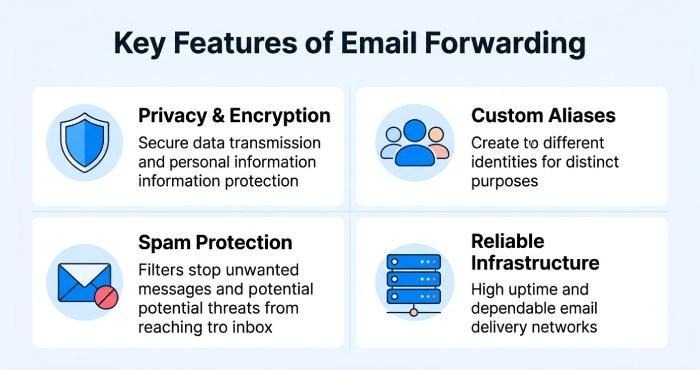
When selecting an email forwarding service, it is essential to compare the following features, each influencing the security, flexibility, and efficiency of your communication setup:
Privacy Protection and Encryption
Given the increasing prevalence of cyber threats, privacy protection is paramount. The best email forwarding providers implement robust encryption protocols, both in transit and at rest, safeguarding sensitive correspondence from interception or unauthorized access. Advanced providers like Proton Mail and Tutanota are recognized for secure email environments and privacy-centric architectures.
Custom Email Address and Email Alias Support
A top-notch service should enable limitless custom email address options and support widespread usage of email aliases. Unlimited aliases allow users to compartmentalize incoming emails for personal or business functions, effortlessly distinguishing between departments or projects.
Spam Filtering and Inbox Management
Effective spam filtering is essential for cutting down on unsolicited or malicious emails, reducing bandwidth, and improving productivity. Intelligent inbox management tools, such as email filtering rules and auto-responder capabilities, further streamline message organization and enhance user experience.
Mail Server and Email Hosting Infrastructure
The underlying mail server infrastructure and email hosting reliability are critical for uninterrupted service and rapid message delivery. Features such as uptime guarantee, mailbox storage, and SMTP relay support ensure enterprise-grade reliability. Integration with popular platforms, including Gmail forwarding, Outlook integration, and cloud email service providers like G Suite (Google Workspace) and Zoho Mail, offers expanded connectivity.
DNS Management, Domain Forwarding, and Catch-All Address
Convenient DNS management facilitates seamless domain setup, MX records configuration, and activation of domain forwarding, enabling a quick start for even non-technical users. Catch-all address support is crucial for minimizing lost messages and achieving true business email professionalism.
Best Email Forwarding Services: SimpleLogin, Addy.io, DuckDuckGo Email Protection, Forward Email, and ImprovMX
SimpleLogin
SimpleLogin stands out for its ease of use and solid privacy protection. The service allows for unlimited forwarding and unlimited aliases under a single account—ideal for users managing multiple identities or wish to separate business and personal communications. With automatic email forwarding rules, robust spam filtering, and user-friendly interface, SimpleLogin shines for privacy and flexibility. Encryption is utilized end-to-end, and browser extension and mobile compatibility ensure accessibility everywhere.
Addy.io
Addy.io offers a powerful suite for custom email address management and domain forwarding. Features include catch-all address functionality, in-depth inbox management, and granular email filtering rules. API integration enables businesses to automate workflows, while rich SMTP relay and IMAP access allow seamless interoperability with other mail servers or third-party email hosting. Addy.io excels in supporting multiple domains and complex business email needs.
DuckDuckGo Email Protection
Known for its commitment to privacy protection, DuckDuckGo Email Protection provides free email forwarding that strips away trackers and enhances anonymity. With easy setup, powerful spam filtering, and instant email redirection, it’s an appealing choice for personal privacy advocates. Integration with professional email platforms (like Outlook.com or Gmail) is straightforward, making it a preferred ad-free service for individuals who want robust, secure email forwarding without sacrificing usability.
Forward Email
Forward Email is an open-source, privacy-focused service excelling in both domain forwarding and custom email address management. Its transparent infrastructure highlights security best practices, privacy protection, and uncompromised email reliability. Support for catch-all addresses, bulk forwarding, white-label email, unlimited forwarding, and multiple domains makes it a favorite among developers and businesses seeking granular control and transparency. Fastmail Masked Email and SimpleLogin often recommend Forward Email for its security, scalability, and free email forwarding plans.
ImprovMX
ImprovMX streamlines email hosting for custom domains with straightforward setup, robust DNS management tools, and near-instantaneous configuration of MX records. Businesses can rely on its high deliverability, uptime guarantee, and comprehensive support for mail server integrations. ImprovMX’s advanced catch-all address functionality, seamless mailbox storage management, and automatic forwarding make it versatile for business, professional email, or personal privacy needs. With flexible subscription plans—from free email forwarding to enterprise solutions—ImprovMX scales with your requirements. For cPanel email or traditional web hosts like Bluehost and GoDaddy, ImprovMX is often a go-to for adding forwarding capability.
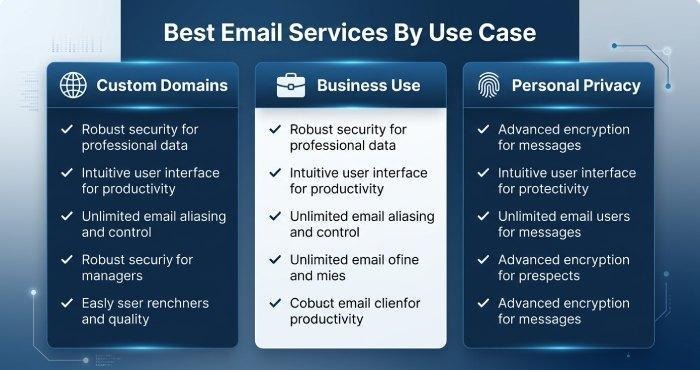
Choosing the Best Service for Custom Domains, Business Use, and Personal Privacy
For Custom Domains
For users seeking powerful domain customization, Forward Email, ImprovMX, and Addy.io stand out. Their advanced DNS management tools streamline integration with any domain registrar (such as Namecheap or Hover), and support for multiple domains and white-label email allows full branding control over your custom email address configuration. ImprovMX and Forward Email, in particular, simplify MX records management and provide setup guides tailored for both beginners and advanced users.
For Business Use
Businesses prioritizing email reliability, uptime guarantee, and advanced integrations (including API integration, SMTP relay, and IMAP access) should consider Addy.io, Forward Email, or ImprovMX. Each provider offers scalable email hosting, robust spam filtering, and support for mailbox storage and shared inbox structures. Fastmail, Zoho Workplace, and Rackspace Email offer more full-featured enterprise email solutions, integrating automation, auto-responder, bulk forwarding, and secure email migration across departments. If you require Outlook integration, consider professional email services that prioritize seamless connectors.
For Personal Privacy
Those focused on digital privacy should look toward SimpleLogin, DuckDuckGo Email Protection, or Proton Mail. Their strong privacy protection, anonymous email alias generation, and device-independent mobile compatibility make them outstanding choices for minimizing personal data exposure. Tutanota and AnonAddy are also leading privacy-centric options, emphasizing end-to-end encryption, data retention controls, and straightforward ad-free services.
Setup Tips, Security Best Practices, and Final Recommendations
Setup Tips
- DNS Management and MX Records: Carefully follow the provider’s setup guide for DNS management and MX records configuration. This step connects your domain registrar (e.g., GoDaddy, Namecheap, Hover) with the new mail server, enabling automatic forwarding and custom domain control.
- Email Aliases and Catch-All Address: Use unlimited aliases and a catch-all address to ensure all messages are delivered. This is especially crucial for scaling business email and managing multiple domains.
- Inbox Management and Filtering Rules: Set up robust inbox management and email forwarding rules to automate sorting, prioritize critical communication, and deploy effective spam filtering.
- Integration with Existing Services: Leverage IMAP access, POP3 support, and SMTP relay to integrate with your current tools (such as Gmail forwarding, Outlook integration, or cPanel email environments).
- Mobile Compatibility and User-Friendly Interface: Select providers offering intuitive dashboards and mobile-friendly interfaces for managing emails on the go.
Security Best Practices
- Enable Encryption: Choose providers offering secure email encryption in transit and at rest. Privacy-focused providers like Proton Mail and Tutanota are strong examples.
- Activate Two-Factor Authentication: Protect your accounts by enabling two-factor authentication, a vital security layer for both personal and business email environments.
- Regularly Review Data Retention Policies: Understand your provider’s data retention terms, especially if you forward sensitive business or personal email.
- Update Email Filtering Rules: Review and update your spam filtering and email filtering rules periodically to adapt to new threats and evolving spam tactics.
- Monitor Uptime Guarantee and Customer Support: Prioritize services with an established uptime guarantee and responsive customer support—critical for enterprise email solution stability.
By considering these guidelines, you can maximize the benefits of modern email forwarding: streamlined inbox management, enhanced privacy protection, and full control over your custom email address and domain forwarding configurations. Whether using SimpleLogin for privacy, today’s leading services offer robust solutions for every case—from personal privacy to professional email and advanced enterprise email solution needs.